What is MARLIN?
MARLIN is a robotics platform and competition focused on maritime robotics. The MARLIN platform includes the software system you use to program and run a MARLIN competition robot.
You write a Python program that describes what your robot should do. The MARLIN VS Code extension runs that program, connects to the Controller over USB, and passes commands and robot state between your laptop and the robot.
The pieces of the system
flowchart LR
    laptop["Laptop\nVS Code + MARLIN extension"]
    program["Your Python program\nuses the marlin API"]
    controller["Controller\nUSB serial device"]
    robot["Robot\nthrusters, servos, sensors"]

    program <--> laptop
    laptop <--> controller
controller <--> robot| Piece | What it does |
|---|---|
| Laptop | Runs VS Code, the MARLIN extension, and your Python program |
| MARLIN extension | Opens the control station, launches your program, and owns the Controller USB connection |
| Python API | The marlin package your program imports |
| Controller | Connects to the laptop over USB and relays packets to and from the robot over a Bluetooth (BLE) link |
| Robot | The physical robot with effectors, sensors, and the robot brain |
The most important rule:
Your Python program does not talk to USB or wireless hardware directly. It talks to MARLIN.
Autonomous and driver control
Most robot programs have two main phases:
| Phase | What happens |
|---|---|
| Autonomous Period | Your robot runs code without driver joystick input |
| Driver Controlled Period | Your robot responds to controller input |
In MARLIN, you write Python functions for these phases:
def autonomous(robot):
    while robot.running:
        ...


def driver(robot):
    while robot.running:
        ...


robot.run(autonomous=autonomous, driver=driver)
MARLIN calls the correct function when the match moves from one phase to the next.
For the 2026 MARLIN Competition Season, Link Lockdown, a Match is three minutes of playtime: a 20-second Autonomous Period and a 2-minute-40-second Driver Controlled Period. See Competition vocabulary for the terms that matter in code.
Hardware names
Your program talks about hardware using port names:
| Port type | Examples | Used for |
|---|---|---|
| Sensor ports | S1, S2, ..., S6 |
IMUs and radio beacons |
| Effector ports | M1, M2, ..., M8 |
Thrusters and servos |
Before your program can run, you declare what is plugged into those ports:
This declaration helps MARLIN catch configuration mistakes before the robot can move.
The controller
The driver holds the Controller. Its sticks and buttons are the inputs your
driver code reads:
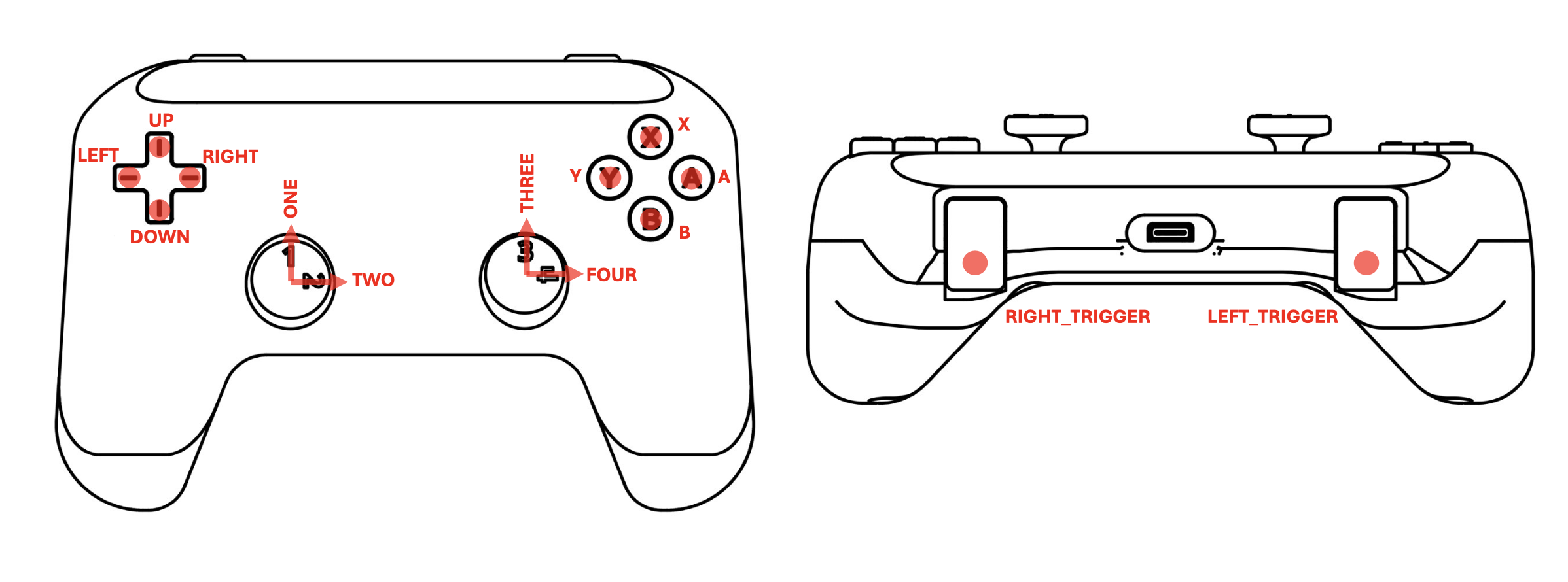
robot.controller.joystick("ONE").value   # a stick axis, -100 to 100
robot.controller.button("A").is_down     # a button, True or False
See Controller input for every name.
What you need to learn first
To write basic robot code, focus on these ideas:
- Create one
Robot. - Call
robot.configure(...)once. - Write
autonomousand/ordriverfunctions. - Use
while robot.running:inside the driver function. - Read controller and sensor state from
robot. - Command thrusters and servos through
robot.
You do not need to understand the packet protocol, threading model, or pool server to write your first program.
When you are ready, continue to Install MARLIN.