MARLIN API
To use the MARLIN API, import the marlin library in your Python code.
The API has four parts:
- Robot (configuration, match state)
- Controller (joysticks and buttons)
- Effectors (thrusters and servos)
- Sensors (IMU and radio beacon)
Robot
Robot()
Robot is a class. Import it from MARLIN and create one object robot at the start of your code.
configure()
configure() declares the type of hardware connected to each port to the Robot Brain. Only list the ports you use. A wrong declaration will throw an error.
| Parameter | Ports | Types | Limit |
|---|---|---|---|
sensors |
S1–S6 |
IMU, RadioBeacon |
At most 2 IMUs, 1 RadioBeacon |
effectors |
M1–M8 |
Thruster, Servo |
— |
| Error | When |
|---|---|
ValueError |
A bad port name, or too many sensors of one type |
TypeError |
A type that is not a supported sensor or effector |
RuntimeError |
Called twice, or the brain reports different hardware than you declared |
run()
run() watches robot.phase and calls the respective match phase function once.
You write one function per phase and pass them in here — each is optional, keyword-only, and receives the robot. Each function is called once, the moment its phase starts, so it must keep looping until the phase ends — that is what while robot.running: is for. run() blocks until the match is over or an E-Stop fires.
Whenever a phase ends — or your function returns early — MARLIN idles every
effector. A function that returns early is not called again that phase; one
that loops past the end is stopped and its commands ignored. An exception in
your function stops the robot, then comes out of run() with the usual
Python traceback.
| Parameter | Description |
|---|---|
initialize |
Runs before the first phase. Setup only: read sensors, print, work out numbers. Effector commands here are thrown away. Put anything that moves hardware in autonomous() or driver(). |
autonomous |
Runs when the Autonomous Period starts. |
driver |
Runs when the Driver Controlled Period starts. |
Match State
Seven read-only properties describing the robot and the match. The Pool Server dictates the match phase. In its absence, MARLIN can specify the match phase from the control station.
| Property | Type | Meaning |
|---|---|---|
robot.running |
bool |
True while the phase your function was called for is still going |
robot.phase |
Phase |
Which part of the match the robot is in right now |
robot.link_ok |
bool |
True while the wireless link to the robot is healthy. False means your commands are not reaching the Robot. |
robot.estopped |
bool |
True while the robot is emergency-stopped. E-Stop can be activated and cleared by the Pool Server and MARLIN control station. |
robot.overtemp |
bool |
True while the brain is overheating. The Robot Brain's thermal protection trips at 50°C. Full functionality is restored once it has cooled to 45°C. |
robot.battery_voltage |
float |
Battery's voltage in volts (V). Reads 0.0 before the Robot Brain reports anything. |
robot.controller |
Controller |
The handheld control panel — see Controller |
robot.running
True while the phase your function was called for is still going. False when the phase ends, causing a while robot.running: loop to exit at the end of a match phase.
robot.running runs at a rate of 50 Hz, the same rate MARLIN sends commands. Adding time.sleep() decreases the frequency.
Example
robot.phase
Reads which part of the match the robot is in.
Example
Phase |
Meaning |
|---|---|
CONFIGURING |
Program started, configure() not done yet |
CONFIGURED |
Hardware declared and confirmed |
AUTON |
Autonomous Period |
PAUSE |
Between phases |
DRIVER |
Driver Controlled Period |
ESTOP |
Emergency Stop |
POSTMATCH |
After the match |
Controller
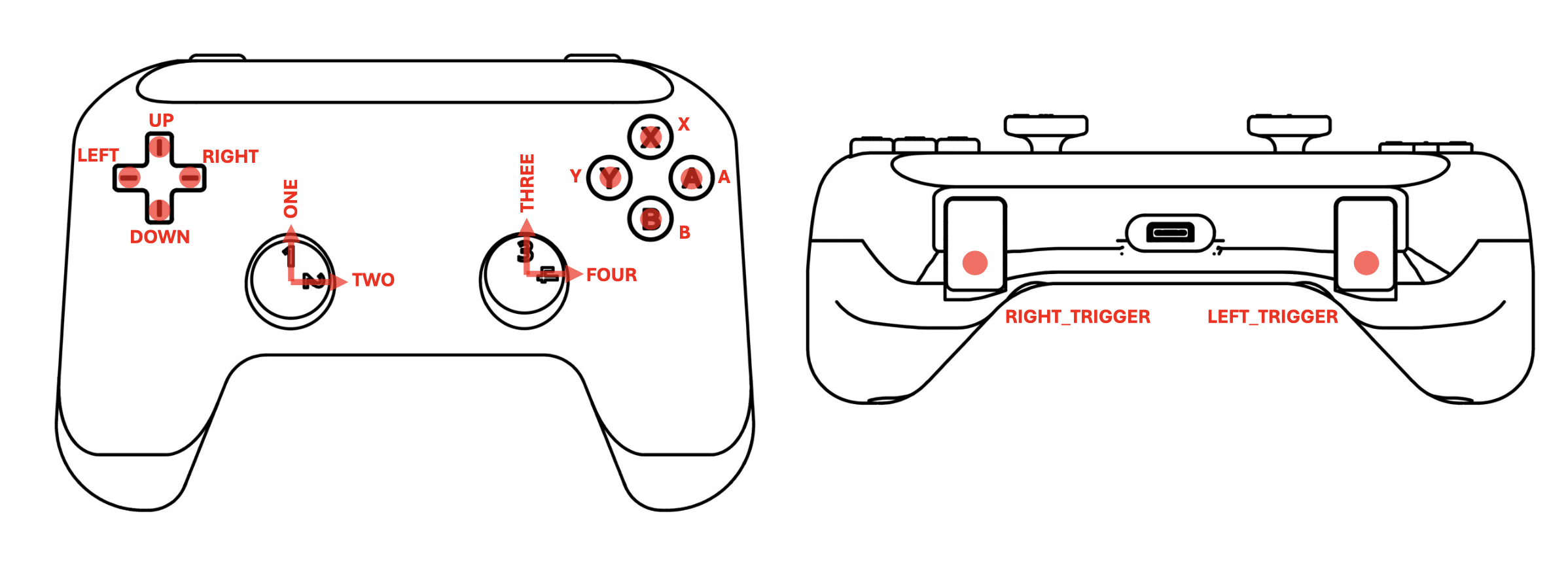
The Controller has four joystick axes and ten independent buttons. Follow the naming conventions strictly. A wrong button or joystick axis name will throw an error.
robot.controller.joystick()
Returns one of the four joystick axes. There are two types of values that can be returned, scaled and raw values.
robot.controller.joystick().value
How far the stick is pushed: −100 to 100, and 0 when centred. The joystick axis range matches the thruster's duty, so a stick can drive a thruster directly.
robot.controller.joystick().raw
The unscaled reading behind value: 0–4095, with centre at 2048. raw is used for checking a stick's true centre or writing your own scaling.
robot.controller.button().is_down
Returns the button state. True while the button is held down, False when released.
Reading the current state of the button:
Recording a button press event:
| Parameter | Description |
|---|---|
name |
One of UP, DOWN, LEFT, RIGHT, X, Y, A, B, LEFT_TRIGGER, RIGHT_TRIGGER. An unknown name raises ValueError. |
Effectors
Declare the type of effector in configure() and fetch it with robot.thruster() or robot.servo(). These are the generic behaviours of effectors.
- An effector will follow the last command given in the current match phase.
- Effector inputs are clamped.
- Idle state differs by effector type.
robot.thruster().set_duty()
Set the duty cycle of the thruster from a range of -100 to 100, with 0 being the idle state. Note that this does not represent the exact speed or power of the thruster.
robot.servo().angle()
Turns a positional servo to an angle from 0° to 180° and holds it there. Due to the nature of positional servos, it will always hold a position within its working range. The idle state of the servos is 90°. Keep that in mind when writing your code.
robot.servo().set_speed()
Set the movement speed of the servo. The speed range is 100 deg/s to 360 deg/s. If the speed isn't defined, the servo will default to 180 deg/s.
Servo Overheating
Continuous driving of the servo for prolonged periods will cause it to overheat, potentially causing damage. Check on your servo periodically during heavy usage. If it feels warm, stop and let your servo cool down.
Sensors
Like effectors, sensors are declared in configure() and fetched with robot.imu() or robot.radiobeacon(). Every sensor has one method: read().
read() returns the latest data measured by the sensor. Every sensor reading carries these three fields:
| Field | Meaning |
|---|---|
timestamp |
Time in milliseconds when the Robot measures the reading. Robot Brain's clock starts from boot. |
age |
How long ago it was measured, in milliseconds. The age is calculated based on the difference in time between the current and previous reading. |
ok |
True if the reading exists and is less than 250 milliseconds old. Reject the reading if False. |
robot.imu().read()
IMU sensor: Acceleration, Turn Rate and Magnetic field.
Returns: ImuReading with ok, age, timestamp and:
| Fields | Unit | Meaning |
|---|---|---|
accel_x, accel_y, accel_z |
g | Acceleration per axis; the axis pointing down reads ≈ -1g at rest |
gyro_x, gyro_y, gyro_z |
°/s | Turn rate per axis; 0 when not turning |
mag_x, mag_y, mag_z |
— | Magnetic field, raw uncalibrated integers |
robot.radiobeacon().read()
Long-range radio receiver. It reports how strong a beacon's signal is and which beacon sent it — not a direction or a distance, though strength does tend to rise as you get closer.
Returns: RadioBeaconReading with ok, age, timestamp and:
| Field | Unit | Meaning |
|---|---|---|
rssi |
dBm | Signal strength, negative, and closer to zero is stronger. |
snr |
dB | How far the signal stands above the noise. Negative means buried. |
beacon_id |
— | Which beacon sent the message. |
rx_count |
— | Total beacon messages received since the start of the code. |
Error Messages
This page lists the errors raised by the MARLIN Python library. In the MARLIN Console they appear under the [OUT] tag, in two forms:
- Exceptions — the program stops with a Python traceback. If the last line of the traceback names one of the types below, MARLIN raised it and the tables explain the fix.
ZeroDivisionError,NameError,SyntaxError, etc. are ordinary Python errors in your own code. [API]warnings — the program keeps running. MARLIN absorbed the mistake and printed what it did about it.
Messages tagged [EXT], [CON], or [POOL] come from the extension, the Controller, or the Pool Server, not from your code. See the MARLIN Console.
MARLIN idles every effector when a match phase ends, regardless of any error.
| Error type | Meaning | Raised by |
|---|---|---|
ValueError |
A value outside the accepted set | configure(), joystick(), button() |
TypeError |
The wrong kind of object in that place | configure(), typed accessors |
KeyError |
A port that was not declared | Hardware accessors |
LookupError |
Sensor absent or ambiguous with port omitted |
imu(), radiobeacon() |
RuntimeError |
Calls in the wrong order, or the robot disagrees | configure(), run() |
LinkError |
The connection to the extension or robot failed | Any call that talks to the robot |
[API] warnings |
Non-fatal mistakes MARLIN worked around | run(), effector commands |
ValueError
| Message | Cause and fix |
|---|---|
Invalid sensor port 'S9'. Expected one of S1, S2, ... |
Sensor ports are S1–S6. |
Invalid effector port 'M9'. Expected one of M1, M2, ... |
Effector ports are M1–M8. |
At most 2 IMU may be configured; got 3 (S1, S2, S3). |
A robot supports at most 2 IMUs and 1 RadioBeacon. Remove the extras. |
Unknown joystick 'FIVE'. Expected one of ONE, TWO, THREE, FOUR. |
Joysticks are named by the numbers printed on the panel. |
Unknown button 'START'. Expected one of UP, DOWN, ... |
Buttons are named by their panel labels — the message lists all ten. |
TypeError
| Message | Cause and fix |
|---|---|
S2: sensor declaration must be a Sensor subclass. |
Write the bare type in configure(): IMU, not IMU() and not "IMU". |
S2: unsupported sensor type Servo. Known types: IMU, RadioBeacon. |
A sensor port received an effector type, or vice versa — sensors= and effectors= are swapped or mixed up. |
M1 is configured as servo, not a Thruster. |
Wrong accessor for the port's type — this port holds a servo, so use robot.servo("M1"). |
KeyError
| Message | Cause and fix |
|---|---|
KeyError: 'M3' |
The port was not declared in configure(). Add it there, or use a port you did declare. |
LookupError
| Message | Cause and fix |
|---|---|
No IMU is configured. |
robot.imu() was called with no IMU declared. Add one to sensors=. |
2 IMUs are configured (S1, S2); specify the port, e.g. robot.imu('S1'). |
More than one sensor of that type is configured — name the port. |
RuntimeError
| Message | Cause and fix |
|---|---|
Robot.configure() is only legal before the robot is armed. |
configure() runs once, at the top of the program. Remove the second call. |
Robot.arm() requires a successful Robot.configure() first. |
run() was called before configure(). Swap them. |
Robot configuration mismatch. Expected ..., got ... |
The declared hardware differs from what the Robot Brain reports. Ensure that your code is consistent with the wiring. |
LinkError
Raised when the connection between the program, the extension, and the robot
fails. These are not code problems — check the control station: Controller
connected, Robot Brain paired, battery in. ("C3" in these messages means the
Controller.) LinkError is a subclass of RuntimeError.
| Message | Cause and fix |
|---|---|
Extension not reachable at tcp://... |
The program was started outside MARLIN — VS Code's own Run button does this. Start it from Match Control instead. |
Timed out waiting for the robot to confirm its configuration. |
Nothing answered: Controller not connected, or the Robot Brain unpaired or off. |
Timed out waiting for arm acknowledgement ... |
As above, detected at the start of run(). |
The robot rejected its configuration. |
The Robot Brain refused the declared configuration. |
The robot rejected arm. |
The Robot Brain refused to enable motors — it is e-stopped or overheated. Check the control station dials and E-Stop state. |
Lost connection to the MARLIN extension ... |
The connection dropped mid-run — usually the Controller USB cable. |
[API] warnings
Printed to the MARLIN Console; the program keeps running. Each warning states what MARLIN did about the mistake.
| Message | Cause and fix |
|---|---|
driver() has no loop. ... |
The function ran once and returned immediately. Loop on while robot.running:. |
driver() loops but never checks robot.running, ... |
The loop cannot end on its own; MARLIN stops it at the phase change. Add robot.running to the loop condition. |
the auton phase started, but run() was not given autonomous=; ... |
No function was passed for that phase. The robot idles — intended for a driver-only program. |
driver() returned before the driver phase ended; ... |
The function finished early — often a return inside the loop. It is not called again that phase. |
driver() ran past the end of the driver phase; MARLIN stopped it. — or ... is still running ...; its outputs are ignored. |
The phase ended while the code was still going. The overrunning code cannot move the robot. |
M1: set_duty(nan) is not a usable number, ... |
A calculation produced nan — usually a division by zero. The effector keeps its previous setpoint. |